
FOR RESIDENTS IN JAPAN
Rakuten Mobile in English
Compare monthly costs, check what you need to apply, and find help with your plan.
Independent guide · Not an official Rakuten Mobile website

Key referral conditions before you log in
- Eligible plans: Rakuten SAIKYO Plan and Rakuten SAIKYO U-NEXT, plus the Rakuten Turbo home router (separate conditions).
- Referral login first: before you apply, log in through the referral link with the same Rakuten ID you will use for the application. The login alone is not an application.
- Deadline for smartphone plans: apply, start using your line and make a call of at least 10 seconds with the Rakuten Link app by 23:59 on the last day of the second month after your login. Because the login date sets this deadline, log in when you are ready to apply. Rakuten Turbo has its own conditions.
- Points: paid in three installments, starting about four months after your login month. They are time-limited Rakuten Points, not cash.
Find the guide you need
Choose a guide for the stage you’re at, from checking your options to managing your line.
Before you apply
Apply and activate your line
Which situation applies to you?
In short: keeping your Japanese number is an MNP application, which can receive 14,000 points. Any other eligible application is a new sign-up, which can receive 13,000 points. If you have not arrived in Japan yet, prepare now and apply after you arrive.
Whether you already live in Japan or are getting ready to move, start with the situation closest to yours.

I want to keep my Japanese number
Switching from another Japanese carrier while keeping your number is called MNP (mobile number portability). If all conditions are met, an MNP application can receive 14,000 points. Check whether your current carrier supports MNP One Stop, which lets you switch online without an MNP reservation number.
I need a new Japanese number
If you live in Japan but have no Japanese number to move, you apply as a new sign-up, which can receive 13,000 points if all conditions are met. Your main tasks are identity verification, payment and checking your phone.
I haven’t moved to Japan yet
You can prepare now. To apply, you need a valid identity document that Rakuten Mobile accepts for your situation, with the required details; a residence card, for example, must show your address in Japan. You can apply from outside Japan, but the first activation must be done in Japan, and SIM cards cannot be shipped abroad. The referral login also starts a deadline, so don’t log in early.
Need Wi-Fi at home as well? The referral also covers the Rakuten Turbo home router, with its own conditions.
Keeping your number or getting a new one
| Keep your number (MNP) | New number | |
|---|---|---|
| Reward if all conditions are met | 14,000 points | 13,000 points |
| Extra preparation | Use MNP One Stop if your carrier supports it; otherwise get an MNP reservation number | None beyond the standard items |
| Contract name | Must be the same at your current carrier and at Rakuten Mobile | Your name as on your identity document |
| Applying online | A reservation number needs at least 7 days of validity left | No number to transfer |
| Applying at a shop | Bring an MNP reservation number | No number to transfer |
Rakuten Mobile campaigns: regular referral, employee referral or Mikitani?
All three offers below cover eligible smartphone-plan applications, with conditions. The points are awarded later; they do not change the monthly plan price. “MNP” means moving an existing Japanese number from another carrier; a new number is a different application.
| Offer | Who and how many lines? | MNP / new number | Award schedule | Application route |
|---|---|---|---|---|
| Regular referral (1784) | First Rakuten Mobile application; one rewarded line per person. | 13,000 / 12,000 points | Three installments, starting four months after the referral-login month. | Log in via the regular referrer’s link before applying; apply, activate and make an eligible Link call by the end of the second month after login. |
| Employee referral (2162) | Also covers eligible returning subscribers and additional lines; up to five rewarded smartphone lines per person. | 14,000 / 13,000 points | Three installments, starting four months after the referral-login month. | Use an employee’s referral login, then the same Rakuten ID for the application. Complete the required steps by the end of the second month after login. |
| Mikitani offer (2798) | Eligible new and returning subscribers; one rewarded contract per person. | 14,000 / 13,000 points | Three installments, starting two months after the month activation and the required Link use are confirmed. | Use the designated campaign application button and coupon; at a shop, show its page and apply the coupon. Activate and make the required Link call by the end of the next month after applying. |
These rewards cannot be added together. Each offer allows only the combinations listed in its terms. Applying with the Mikitani coupon makes 2798 apply instead of regular or employee referral, even after a referral login. Device offers can also change eligibility. Check combinations before completing your application.
For a returning subscriber or an additional line, check employee referral and the Mikitani offer’s remaining eligibility first. For a first application, compare both the conditions and when the points arrive. This site’s referral buttons use my employee referral link (2162). They do not enter you into 1784 or 2798. Rakuten Turbo has separate employee-referral conditions below and is not included in this smartphone comparison.
Sources: Regular referral terms (Japanese) · Employee referral terms (Japanese) · Mikitani offer terms (Japanese). Base rewards for current applications; additional U-NEXT offers have separate conditions.
What does the employee referral offer include?
In short: if every condition is met, an eligible Rakuten SAIKYO Plan or Rakuten SAIKYO U-NEXT application receives up to 14,000 time-limited Rakuten Points, paid in three installments.
This is Rakuten Mobile’s campaign for customers referred by a Rakuten employee (campaign code 2162). It applies when you apply for the Rakuten SAIKYO Plan or Rakuten SAIKYO U-NEXT.
| Application | 1st | 2nd | 3rd | Total |
|---|---|---|---|---|
| MNP transfer | 5,000 | 5,000 | 4,000 | 14,000 |
| Other new sign-up | 5,000 | 4,000 | 4,000 | 13,000 |
- The points are time-limited Rakuten Points, paid in three installments.
- The offer also applies if you are adding a second line or subscribing again after a previous contract. Rewards are capped at five lines per person.
- The campaign has no announced end date, and Rakuten Mobile can change or end it without notice. Reward amounts have changed before, so check the official terms on the day you apply.
- New applications for Rakuten SAIKYO Plan (Data Type) are temporarily suspended.
- The home router Rakuten Turbo is also covered, with a 7,000-point reward and separate conditions. See Rakuten Turbo.
Before applying, use the employee referral link on this page to log in with your Rakuten ID. Then review the current campaign terms, including exclusions, on Rakuten’s website before submitting your application.
Plans, monthly prices and fees
Referral points are separate from your monthly bill. Choose a plan based on your data use and the services you need, then compare the campaign conditions.
Rakuten SAIKYO Plan changes price with your monthly data use. Rakuten SAIKYO U-NEXT includes the streaming service. Devices, paid options, chargeable calls and applicable fees can add to the plan price.
Compare monthly prices, included services, discounts and extra fees →
Before applying, also check payment methods, your first bill and cancellation and final-bill rules.
Can you apply, and what should you prepare?
Getting a new Japanese number? Start with these four steps.
- Check your monthly costs.
- Check your ID documents and payment method.
- Check your phone and choose a SIM card or eSIM.
- Choose a new number when you apply. If you’re using employee referral, complete the referral login before applying.
Identity documents and matching details
Check which documents and application routes are available for your situation, including your card’s IC chip address and how to enter your name. Our requirements for foreign residents guide covers adult applications and explains the documents and name-entry rules.
Payment method
Check the accepted payment methods, whose name must be on the card or bank account, and any handling fees. Read the payment guide before applying.
Choose how to apply and get connected
- Compare identity verification routes, or use the shop guide to prepare for a visit.
- Check coverage where you use your phone and your exact phone model.
- Choose a SIM card or follow the eSIM guide.
- Keeping a Japanese number? Read the MNP guide before switching.
Once you are ready, compare the campaign routes and follow the employee referral steps. Referral login alone does not submit an application or guarantee points.
How to use the employee referral campaign
In short: log in through the referral link, apply with the same Rakuten ID, activate your line, then make a Rakuten Link call of at least 10 seconds, all by the deadline set by your login date.
There are four stages. Finishing one does not complete the others, and the referral login alone does not guarantee points. These steps are for the smartphone plans; for Rakuten Turbo, see its own conditions.
Before you apply: use the referral link to log in with the same Rakuten ID you’ll use for your application. The referral login alone does not submit your application.
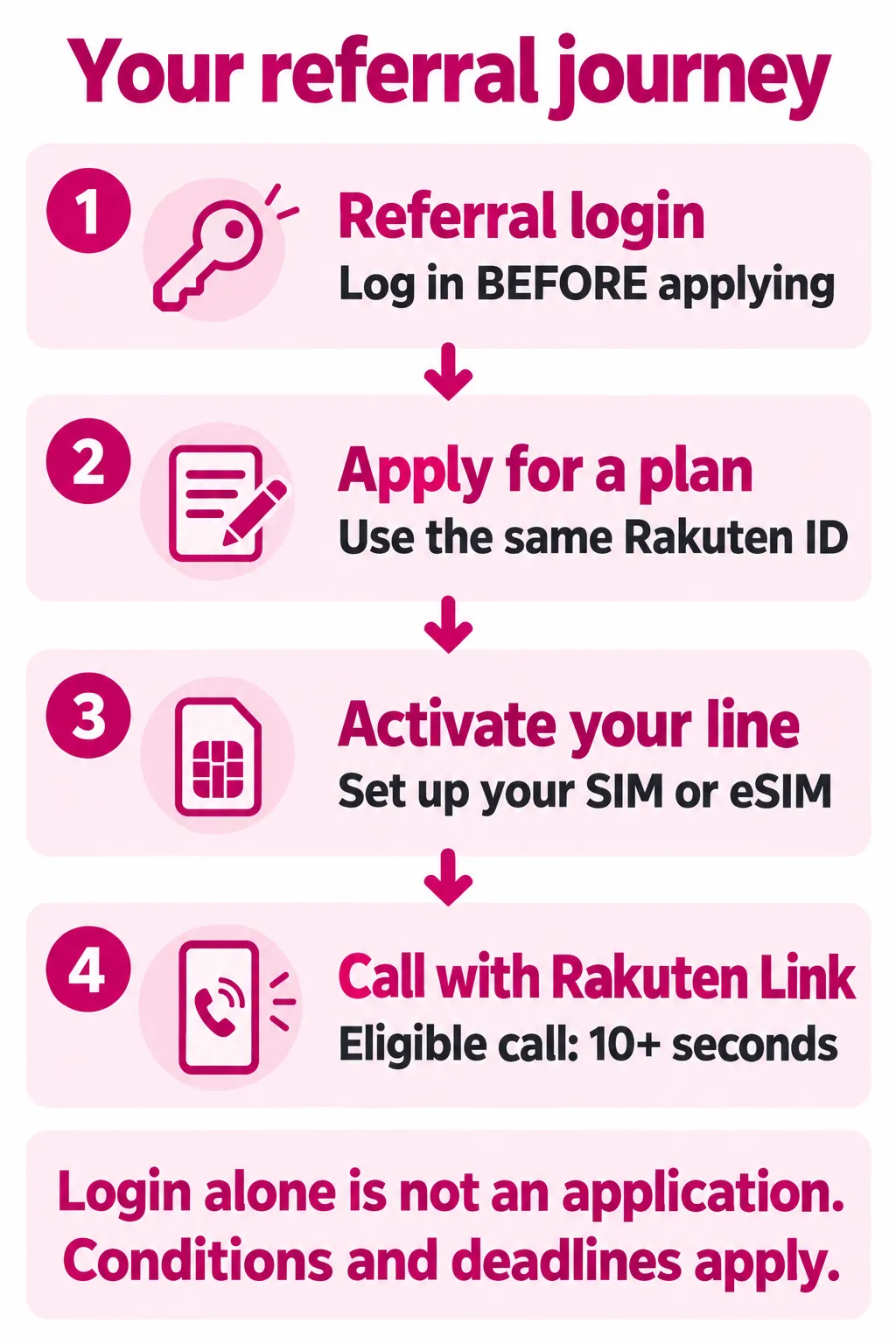
| Stage | What it does | How you know it is done |
|---|---|---|
| 1. Referral login | Records the referral. It is not an application. | No referral confirmation email is currently sent. Note the date you logged in and use the same Rakuten ID to apply. If you’re unsure whether the referral was recorded, contact the employee who referred you. |
| 2. Application | Applies for the plan, including identity verification | An application completion email from Rakuten Mobile |
| 3. Activation | Starts your line on the Rakuten Mobile network | Your SIM or eSIM connects to the Rakuten Mobile network |
| 4. Rakuten Link call | Meets the call condition (at least 10 seconds) | Rakuten Link (Domestic) call time in my Rakuten Mobile’s usage status |
-
Log in through the referral link
Before you log in, check which identity documents you can use and have one ready. Use the referral button above and log in with your Rakuten ID. If you don’t have one, register first. Referral login confirmation emails are currently suspended.
Log in before you apply, using the same Rakuten ID you will use for the application. The login date sets the deadline for the remaining steps, so log in when you are ready to apply.
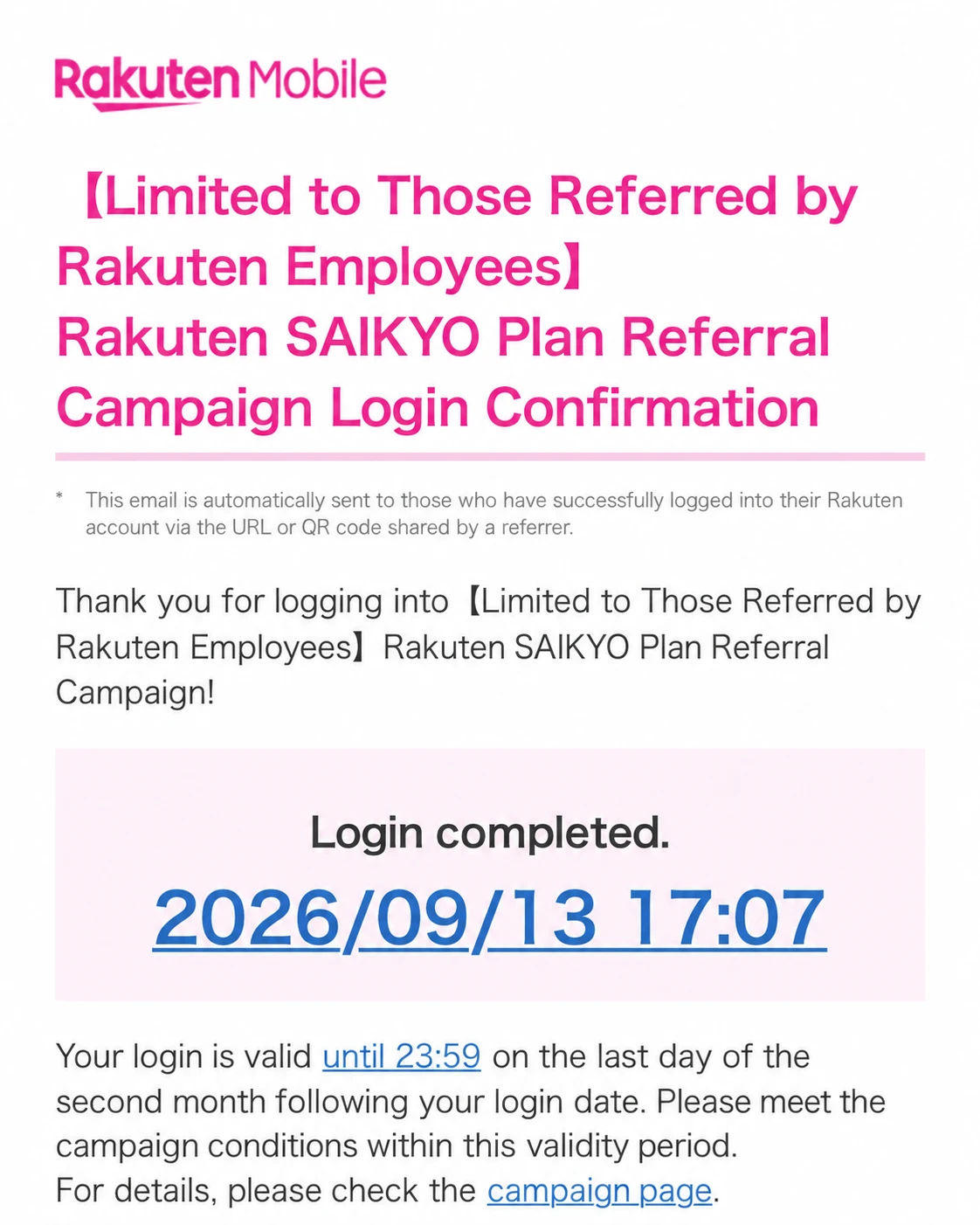
Past login confirmation email example (currently suspended)

Past example. Referral login confirmation emails are currently suspended. This email records a referral login. Receiving one does not guarantee that all campaign conditions have been met or that points will be awarded. -
Apply for an eligible plan
Apply for the Rakuten SAIKYO Plan or Rakuten SAIKYO U-NEXT online or at a Rakuten Mobile shop, using the same Rakuten ID. Choose MNP if you want to keep your current number. If you apply online, choose an identity verification method you can use. The smartphone identity check is labeled スマホでかんたん本人確認. After you submit the application, look for a separate application confirmation email from Rakuten Mobile.
-
Start using your line
Follow the SIM card guide or eSIM guide to activate your line. If your eSIM screen shows Continue to activation (開通手続きへ進む) or Continue to eSIM activation (eSIM開通手続きに進む), tap it and follow the prompts. After setup, turn off Wi-Fi and check that you can load a webpage using mobile data on your new line. For MNP, Rakuten Mobile counts the day its signal becomes active on your SIM or eSIM as the start date.
-
Make a call with Rakuten Link
Rakuten Link is Rakuten Mobile’s calling and messaging app. On the line you applied for, make a call of at least 10 seconds in the app. Calls to numbers starting with 0570, the special number 188 and calls made with prefix numbers do not count. To check the call requirement in my Rakuten Mobile, open Usage (利用状況), select the Calls (通話) tab and check that Rakuten Link (Domestic) (Rakuten Link(国内)) shows at least 10 seconds for the line you applied for. Calls between two Rakuten Link users are not shown in that usage screen; you can check those in Rakuten Link’s own call history.
What the online application looks like
Rakuten Mobile’s online application guide sets out four steps:
- Prepare what you need and check that your phone can be used.
- Choose SIM card or eSIM.
- Choose an identity verification method.
- Apply for a new number or to keep your current number (MNP), using the same Rakuten ID as your referral login.
After you apply, you can track your application and delivery status in my Rakuten Mobile. You can also apply at a Rakuten Mobile shop; Rakuten Mobile says its shops offer English support from application to initial setup. Its shop page describes this as English materials and a phrase sheet, so check with the shop before you go; see what to expect at a Rakuten Mobile shop.
Setting up Rakuten Link
Download Rakuten Link from the App Store or Google Play. Rakuten Link is also where you now manage your contract: the separate my Rakuten Mobile app ended on August 5, 2026, and its functions, including first-line activation, moved into Rakuten Link (version 4.0.0 or later). The first time you use it, you sign in with the phone number of your Rakuten Mobile line and the Rakuten ID registered to it. If you plan to travel, set it up in Japan first, because sign-in may not be possible in some areas overseas. The app requires iOS 16 or later, or Android 10 or later, according to Rakuten Mobile’s Rakuten Link page. For step-by-step setup on Android and iPhone, see how to set up Rakuten Link.
Deadline: complete steps 2 to 4 by 23:59 on the last day of the second month after your referral login. For example, if you log in on October 10, 2026, the deadline is 23:59 on December 31, 2026.
Rakuten Turbo: home Wi-Fi with 7,000 points
In short: Rakuten Turbo is Rakuten Mobile’s home router service. If you apply for Rakuten Turbo together with the Rakuten Turbo 5G router after the referral login, you can receive 7,000 time-limited Rakuten Points if all conditions are met. The reward is limited to once per person, and no Rakuten Link call is needed.
Rakuten Turbo gives you Wi-Fi at home over Rakuten Mobile’s network. There is no installation work: you plug in the router and connect your devices. Rakuten Mobile suggests it for times such as right after moving house, which makes it relevant if you have just arrived in Japan. You can sign up for Rakuten Turbo without a Rakuten SAIKYO Plan contract.
How the referral reward works for Rakuten Turbo
| Reward | 7,000 time-limited Rakuten Points: 2,000, then 2,000, then 3,000 |
|---|---|
| What to apply for | The Rakuten Turbo plan and the Rakuten Turbo 5G router at the same time |
| Where to apply | Rakuten Mobile online or a Rakuten Mobile shop |
| Deadline | Apply and start billing by 23:59 on the last day of the second month after your referral login |
| Use condition | Nine days must have passed, counting the earlier of the day the service starts or the day you receive the router as day 1 (campaign terms) |
| Rakuten Link call | Not required |
| Limit | Once per person |
| When points arrive | Over three months, from about four months after your referral login month |
The referral login works in the same way as for a smartphone plan: log in through the referral link with the same Rakuten ID you will use to apply. Rakuten Turbo has its own conditions in the campaign terms, separate from the smartphone plans.
Costs
| Monthly plan | ¥4,840 |
|---|---|
| Rakuten Turbo 5G router | ¥41,580 in one payment, 24 payments of ¥1,732 (first bill ¥1,744) or 48 payments of ¥866 (first bill ¥878; Rakuten Card only) |
| Contract administration fee | ¥3,300, first time only |
| Shipping | ¥0 |
- Billing start: Rakuten Mobile’s price page sets the billing start date as day 9, counting the earlier of the day the service starts or the day the router arrives as day 1. This is a billing rule, separate from the campaign’s use condition above.
- Small monthly fees: universal service and telephone relay service fees of a few yen are charged on top.
- Contract term: Rakuten Mobile says Rakuten Turbo has no fixed contract period or minimum term. If you cancel while paying for the router in installments, you still need to pay the remaining installments.
- Payment: credit cards and some debit cards can pay for both the plan and the router. Bank account transfer can be used for the monthly plan but not for the router.
Offers you can combine
The referral terms list Rakuten Turbo campaigns that can be combined with the referral reward; others cannot. Two of the listed programs are shown on Rakuten Turbo’s own pages:
- SAIKYO HOME Program: if you are signing up for Rakuten Turbo for the first time and also use the Rakuten SAIKYO Plan (or Rakuten SAIKYO U-NEXT), you receive 1,000 time-limited points each month in which both services are confirmed at the end of the month.
- Router effectively ¥0: a discount of ¥867 a month on the plan for 48 months offsets the router price. If you cancel before 48 months, the discount stops but the router payments continue.
Check each campaign’s own conditions and period on Rakuten Mobile’s website before applying.
Before you apply: where you can use it
- Registered address only: you can use Rakuten Turbo only at the installation address you register. If you move, you can change the address, as long as the new address is within the service area.
- Its own service area: Rakuten Turbo’s area is different from the smartphone area, so check the Rakuten Turbo area map for your address.
- Placement: Rakuten Mobile recommends a spot near a window, away from microwaves and TVs, and not on a high floor (roughly the 16th floor or above). If Rakuten Mobile judges your address to be outside the service area, such as a high floor or basement, it may cancel the contract.
- Delivery: online orders arrive in as little as 2 days, but it can take about a week. Online orders are delivered only; if you buy at a shop, you may be able to take the router home, depending on stock.
Keep Rakuten Turbo until the points arrive: cancelling Rakuten Turbo before the points are awarded, not starting to use it, or buying outside Rakuten Mobile’s own shops and website makes you ineligible.
Rakuten Turbo (Japanese) · Rakuten Turbo prices (Japanese) · SAIKYO HOME Program (Japanese) · Rakuten Turbo area (Japanese)
When will you receive the points?
In short: points arrive in three installments starting about four months after your login month. Each installment is valid for 6 months, and you can see scheduled points in Rakuten PointClub shortly before they are awarded.
Points start about four months after the month of your referral login, not the month you applied or activated your line, and arrive in three monthly installments. The deadline for the required steps is also counted from your login, so every reader’s dates are different.
Here is an example for a referral login in October 2026. The deadline for applying, starting your line and making the Rakuten Link call would be 23:59 on December 31, 2026, and the points would be scheduled as shown below.
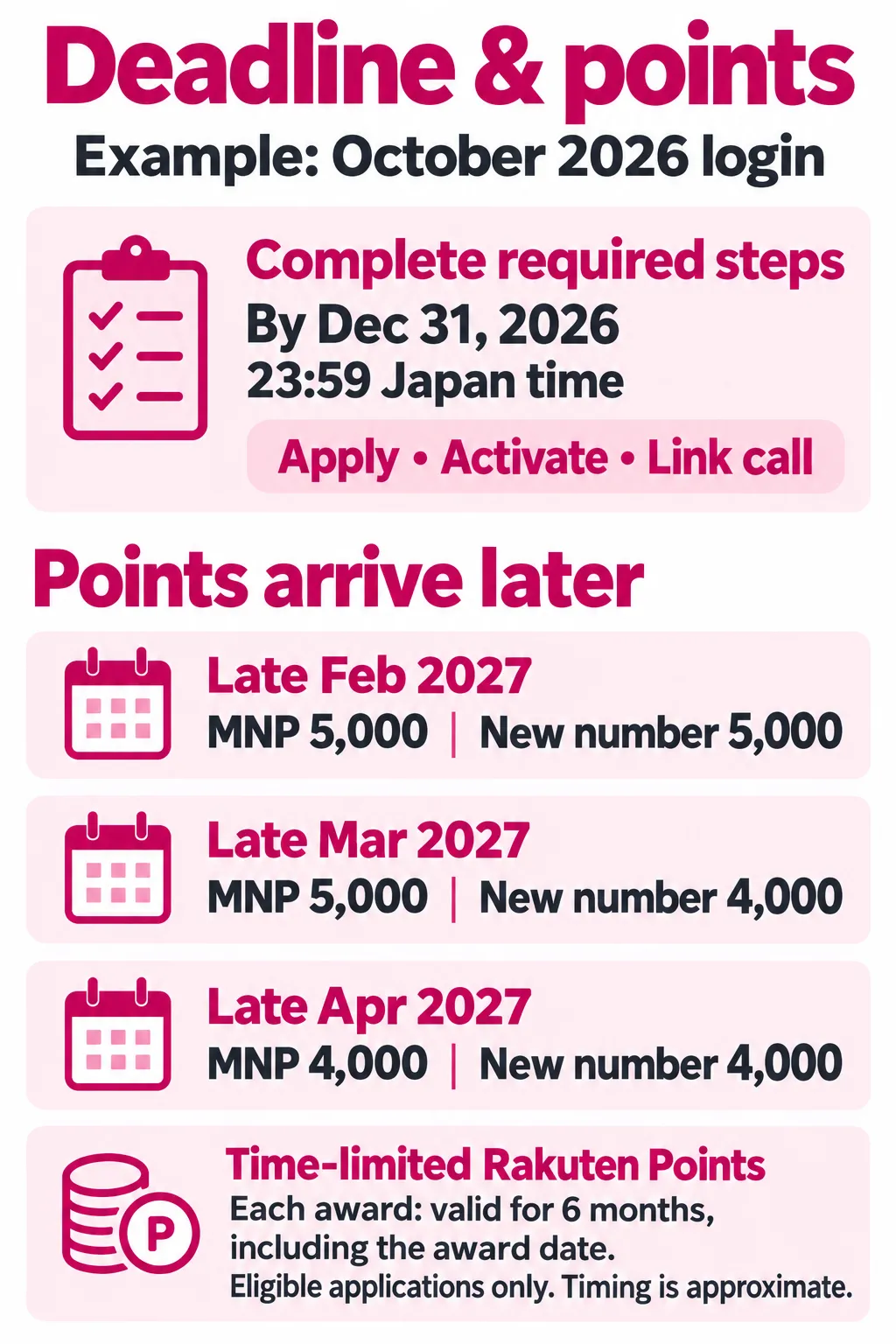
| Installment | Around | Points |
|---|---|---|
| 1st | End of February 2027 | 5,000 |
| 2nd | End of March 2027 | 5,000 |
| 3rd | End of April 2027 | 4,000 |
- For other new sign-ups, the installments are 5,000, 4,000 and 4,000 points.
- For Rakuten Turbo, the installments are 2,000, 2,000 and 3,000 points, on the same schedule.
- These are time-limited Rakuten Points. Each installment is valid for 6 months, counting the day it is awarded.
- They are Rakuten Points, not a cash refund.
- Rakuten Mobile may withhold or cancel points in cases such as suspected fraud, unpaid charges or a very short contract.
Checking your points
Short answer: look in Rakuten PointClub.
- For this campaign (code 2162), Rakuten Mobile says the points appear under Points scheduled in Rakuten PointClub’s point history by 3 days before each award date. You log in with the Rakuten ID you used to apply.
- The date and time of your application are in Rakuten Mobile’s application completion email. Keep it. If you already received a referral login confirmation email, keep that too. Referral login confirmation emails are currently suspended.
- If scheduled points are not awarded on the expected date, Rakuten Mobile notes that it can take time for them to appear.
Using the points
You can use Rakuten Points across Rakuten services, and you can set them to pay your monthly Rakuten Mobile charges at 1 point = ¥1. Points cannot be used for monthly charges if you pay by bank account transfer, and they cannot be used for device installment payments. Because the referral points are time-limited, using them for your phone bill is a simple way to avoid letting them expire.
If you have a question about the campaign
For confirmation that the employee referral campaign applies, Rakuten Mobile’s official FAQ directs you to the employee who referred you. If you used my link on this site, use the contact form for referral-related guidance. I can explain the conditions and what to check; I cannot access or change your contract or guarantee a point award. If someone else referred you, contact that person.
For application status, identity verification, billing or connection problems, contact Rakuten Mobile support. See our English support guide. Point awards are handled by Rakuten Mobile. Checked October 10, 2026.
Common mistakes and how to avoid them
In short: using a different Rakuten ID, missing the deadline or making a call that does not count can each cost you the reward. Check each row before you log in and before you apply.
| Mistake | How to avoid it |
|---|---|
| Logging in with one Rakuten ID and applying with another | Use one Rakuten ID for the referral login and the application. The referral login must use the Rakuten ID registered with Rakuten Mobile. |
| Forgetting the referral login before applying | Log in through the employee referral link before you apply. Use the same Rakuten ID for both steps. |
| Logging in long before you can apply | Log in only when your documents, payment method and phone are ready. The login date sets your deadline. |
| Entering your name differently from your card | Enter the name exactly as on your residence card, in romaji, following the name entry rules. |
| Relying on an out-of-date IC chip address | If you moved after the card was issued, or your address was added later, apply at a shop or update the card first. |
| MNP with a different contract name, or a reservation number about to expire | Change the name at your current carrier first. Online, the reservation number needs at least 7 days left. |
| A call that does not count | Call from the Rakuten Link app on the line you applied for, for at least 10 seconds. Calls from the standard phone app, to 0570 numbers or 188, or with prefix numbers do not count. |
| Combining with another offer by mistake | Only campaigns listed in the official terms can be combined. Applying through the Rakuten Card users’ first-application campaign page (code 3381) gives that campaign priority, and buying a Wi-Fi router at the same time as a Rakuten SAIKYO Plan application makes that smartphone application ineligible. This is separate from Rakuten Turbo, where applying for the Rakuten Turbo 5G router together with the plan is required. |
| Cancelling soon after joining | For smartphone plans, a very short contract can make you ineligible, and cancelling within one year incurs a cancellation fee. |
| A failed payment | Keep your card valid and your balance sufficient. Unpaid charges make you ineligible and can lead to cancellation. |
| Rakuten Turbo: buying the router separately or cancelling early | Apply for the Rakuten Turbo plan and the Rakuten Turbo 5G router together, online or at a Rakuten Mobile shop, and keep Rakuten Turbo until the points are awarded. |
| A phone bought outside Japan that does not work | Check the compatibility page and the Technical Regulations Compliance Mark before you apply. |
Eligibility notes
- Previous contracts and plan changes. Applying again or adding a line is allowed, but Rakuten Mobile may exclude applicants with a history of very short or repeated contracts. Switching an existing Rakuten UN-LIMIT VII contract to the Rakuten SAIKYO Plan is not covered; this is different from applying for a new eligible line.
- Rakuten employees. If you are a Rakuten employee yourself, you are not eligible as a referred customer.
- Applying without a Rakuten ID. If you applied without a Rakuten ID, you must upgrade to Rakuten membership by the end of the month after your application month.
Frequently asked questions
Can I combine regular referral, employee referral and the Mikitani offer?
No. Check the campaign comparison before applying. Each offer has its own eligibility, login or coupon route and reward schedule. The buttons on this page use employee referral (2162).
Is the referral login the same as applying?
No. The login only records the referral. You still need to apply, start using the line and complete the Rakuten Link call by the deadline.
Can I use the offer if I had Rakuten Mobile before?
Yes. Rakuten Mobile says previous subscribers can take part if they meet the conditions, and the offer also covers a second line.
How many lines can receive the reward?
For applications made from June 1, 2024, rewards are capped at five lines per person.
What if more than one person sent me a referral link?
Only the referrer whose link you logged in with first is counted.
Will the referrer see my contract details?
Rakuten Mobile states that it cannot answer a referrer’s questions about a referred person’s personal information, such as contract status. Separately, campaign participant information may be shared with Rakuten Mobile and other Rakuten Group companies to run the campaign.
Is there a contract period or a cancellation fee for the smartphone plans?
For smartphone lines applied for and started from April 1, 2025, cancelling within one year incurs a cancellation fee of up to ¥1,078 (Rakuten SAIKYO Plan) or ¥1,100 (Rakuten SAIKYO U-NEXT), tax included. After one year, there is no cancellation fee. Cancelling early can also make you ineligible for the referral points. Rakuten Turbo has different rules; see Rakuten Turbo.
Does the offer cover home internet?
Yes, the Rakuten Turbo home router. Apply for the Rakuten Turbo plan and the Rakuten Turbo 5G router together after the referral login. If all conditions are met, you receive 7,000 points, once per person. No Rakuten Link call is needed. See Rakuten Turbo.
Can I use Rakuten Turbo anywhere in Japan?
No. You can use it only at the installation address you register, within the Rakuten Turbo service area, which is different from the smartphone area. If you move, you can change the address to one inside the area.
Can I keep using my current phone?
Often, yes. Check your model on Rakuten Mobile’s compatibility page. A phone bought from another carrier may need a SIM unlock, and a phone bought outside Japan may not work even if the model is listed.
Can I apply at a shop instead of online?
Yes. The referral offer covers applications at Rakuten Mobile shops too, and Rakuten Mobile says its shops offer English support from application to initial setup. Log in through the referral link before you go, bring the original of your identity document, and get an MNP reservation number first if you are moving your number.
How long until I can use my new line?
With eSIM and a compatible phone, you can activate online soon after your application is approved. A SIM card ordered online usually arrives within about 2 days, but it can take up to a week depending on screening and delivery.
Can I use Rakuten Mobile when I travel abroad?
In more than 100 countries and regions, up to 2GB of data per month is included, counted toward your monthly data. After 2GB, speed is limited to 128kbps.
Can I pay with a card issued outside Japan?
I could not confirm this. Rakuten Mobile’s payment pages list the accepted card brands but do not clearly say whether cards issued outside Japan can be used when you apply. Check with Rakuten Mobile or at a shop before you apply.
Where can I see whether my points are coming?
In Rakuten PointClub, under Points scheduled in your point history. For this campaign, the points appear there by 3 days before each award date.
I’m moving to Japan soon. What can I do now?
Create a Rakuten ID, check that your phone is compatible and plan how you will pay. You can apply from outside Japan, but the first activation must be done in Japan, SIM cards and products must be received in Japan, and SIM cards cannot be shipped abroad, so Rakuten Mobile recommends applying from within Japan. Wait to log in through the referral link until you have a valid identity document that applies to you, with the required details such as your address in Japan, and you are ready to apply. The login starts the deadline.
Who runs this guide?

I’m Takahiko Tanaka, a Rakuten Group employee since 2011. I run Mobile Start Japan personally to explain the employee referral campaign in plain English. It is an independent website, not an official Rakuten Mobile website. About this site →
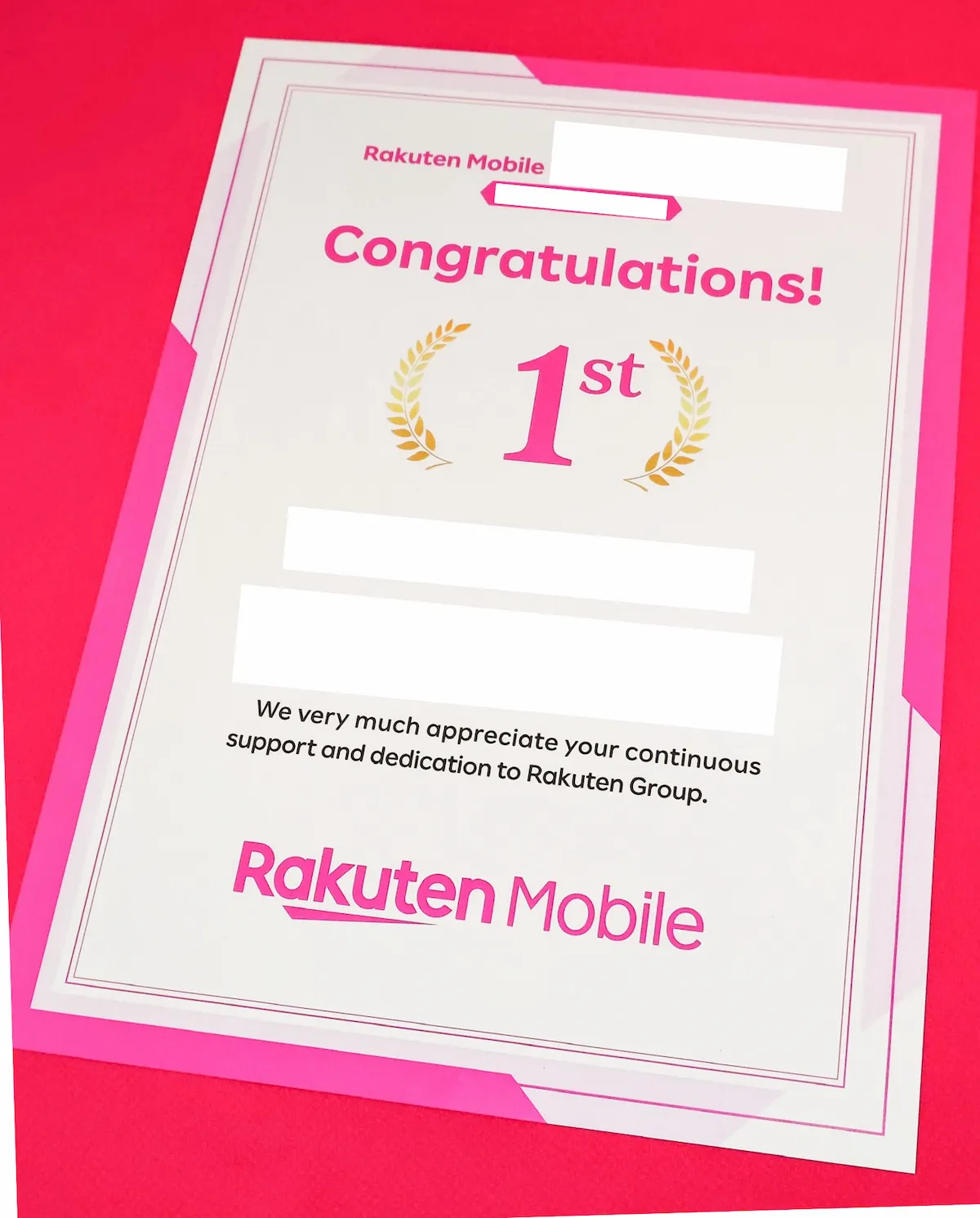
I received a certificate from Rakuten Mobile recognizing my first-place ranking among Rakuten Group employees for employee referrals.
For errors on this site or help locating the terms for my employee referral link, use the contact form. I cannot access your contract or guarantee rewards. For your contract, application status, identity verification, billing or connection, use Rakuten Mobile’s official support options. If you used another employee’s link, contact that referrer about the referral conditions.
Please do not send passwords, identity documents or payment details to this site.
Source checks and editorial updates
Campaign comparison and application route checked against the linked official sources on October 10, 2026. Earlier sections retain their original source-check dates. Homepage layout and navigation revised October 31, 2026; this is not a new verification date for every campaign condition.
Ready to use the referral offer?
If you have your Rakuten ID, identity document, payment method and a compatible phone, log in through the referral link and apply soon after.
Log in for the referral campaign
Still preparing? Go back to what to prepare or common mistakes.
Campaign conditions checked on September 23, 2026, against Rakuten Mobile’s official campaign terms in English and Japanese (the terms state they are current as of September 17, 2026). Plan prices, fees, eSIM activation and the Rakuten Link app information checked against Rakuten Mobile’s official pages on September 24, 2026. Rakuten Turbo conditions, prices and service area information checked on September 25, 2026. Offers and procedures may change.